Town to City Performance Optimization Guide (July 2026)
Town to City is one of the most-loved Early Access city builders on Steam right now, and performance is its loudest player complaint. This guide walks through what players are reporting in May-July 2026, the in-game settings that actually recover frames, the citizen-count thresholds where lag begins, and what Galaxy Grove has on its roadmap to fix it.
What players are reporting right now
Town to City holds an Overwhelmingly Positive rating, but the negative reviews from May through July 2026 share a single recurring theme: the game gets heavy in dense cities. The table below breaks down the six most-quoted reports in that window, with hardware specs, the exact FPS or symptom, and the citizen count at which it appeared.
| Date | Hardware | Symptom | Citizen count | Severity |
|---|---|---|---|---|
| 2026-07-18 | RTX 4070-class laptop, 16 GB RAM | 5-10 FPS at lowest settings after 500-600 citizens | 500-600 | Critical |
| 2026-07-07 | RTX 4060, Ryzen 7 5800X, 32 GB RAM | Considerable frame drops once town is past mid-size | ~150-250 (mid-size) | High |
| 2026-07-04 | Mid-range desktop, mid-tier GPU | CPU pinned at 100 %, hard crash after ~30 min in dense scenes | ~300+ | Critical |
| 2026-06-27 | RTX 5090, Ryzen 7 9800X3D, 32 GB RAM | 40 FPS in dense cities (negative review over optimization) | Not specified (described as dense) | High |
| 2026-06-24 | High-end desktop, 32 GB RAM | Lagging persists even after lowering every graphics setting | Not specified | High |
| 2026-06-21 | Mid-range laptop GPU | Lags at 1080p well before any completion milestone | ~100-150 (early-mid) | High |
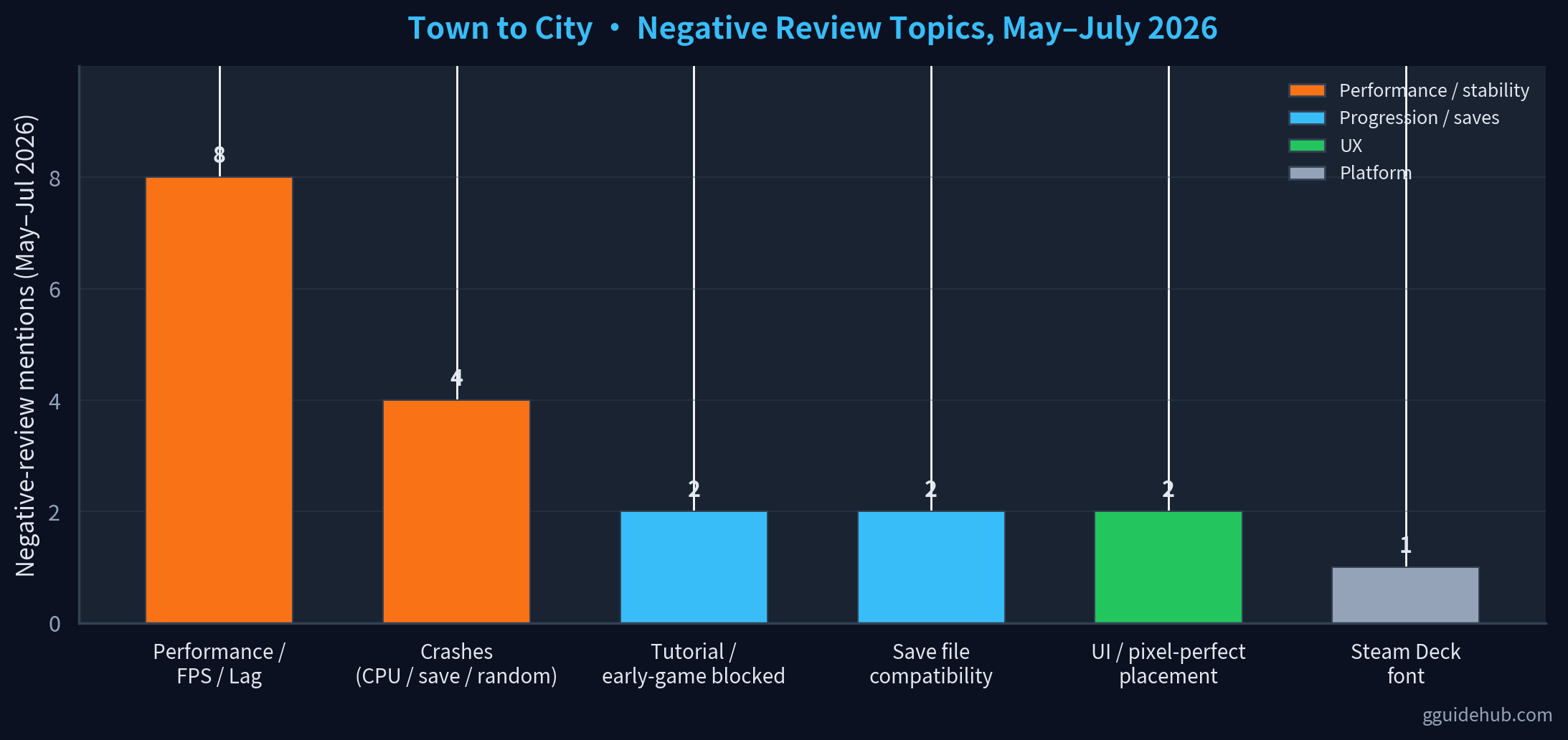
Where the load actually comes from
Town to City does not behave like a grid city builder. Three architectural choices drive most of the late-game CPU cost, and understanding them is what separates "tweak a setting" advice from real fixes.
- Grid-less voxel chunks. Each chunk is streamed and rendered individually. Pushing view distance outward linearly multiplies the number of chunks the engine is asked to draw every frame.
- Per-citizen simulation. Every Worker, Artisan, and Bourgeoisie is its own animated entity with a pathfinding job. Late-game cities can carry 500+ active citizens, all running on one simulation thread.
- Floating-point precision. Galaxy Grove has publicly acknowledged that very large cities expose a floating-point precision bug that makes buildings visually drift and adds cleanup work to the render thread. Recent patches have reduced this, but it is not fully eliminated.
In-game settings that actually recover frames
Eight knobs, ranked by impact based on what shows up in player reports. Start from the top of the table and stop when your FPS stabilises; there is no need to cut everything if your machine is healthy.
| Setting | Recommended | Impact | Why it matters |
|---|---|---|---|
| Render Distance / View Distance | Reduced (default ~75 %) | High | Voxel chunk streaming scales with view distance. Pulling this in is the single biggest GPU saving. |
| Shadow Quality | Low or Off | High | Dynamic shadows on a grid-less map are recomputed whenever citizens and decor move. |
| Post-Processing (bloom, DOF, ambient occlusion) | Off | Medium | Three stacked effects tax the GPU far more than the underlying voxel geometry does. |
| Citizen Detail / Animation Count | Low | High | Each visible citizen is an animated entity; the late-game town can render hundreds at once. |
| Object Decoration Limit | Cap decorative density per district | High | Flowers, fences, and street props are instanced: every placement adds a draw call. |
| Window Mode → Borderless / Fixed FPS Cap 30 | On | Medium | Capping at 30 FPS stabilises the frame time and stops CPU spikes when many citizens move at once. |
| Cloud Save Auto-Sync | Manual save only | Low | Auto-save writes a full snapshot and stalls the main thread for several seconds in big cities. |
| Background Apps (Discord, browsers, OBS) | Closed | Medium | Because the game is CPU-bound, even a tab of Chrome can shave 10 % off the frame budget. |
Layout & citizen management as performance levers
Because the engine is CPU-bound on the simulation thread, the way you build the town matters as much as the way it looks. Five practical levers, drawn from community workarounds posted in July 2026.
- Keep citizens clustered, not scattered. One dense district of 200 citizens is cheaper to pathfind than four districts of 50 each. Citizen pathfinding is the dominant CPU cost.
- Limit decoration density. Every flower pot and fence segment is an instanced draw call. Cap decorative items per district and reserve the heaviest scenery for a small "showcase" zone rather than scattering it everywhere.
- Pause to build. Hit spacebar and lay out new roads or amenities while the simulation is paused. The pause removes the pathfinding spike that would otherwise fire every time a new building unlocks.
- Avoid overlapping amenity coverage. Three taverns covering the same 20 citizens cost three times the entity upkeep of one tavern covering the same 20 citizens. The game does not merge coverage for you.
- Don't grow citizen count for the sake of it. The reports show the FPS cliff sits between 400 and 600 citizens on most hardware. Stalling population growth with deliberate housing limits buys you headroom for the late-game Wonder builds.
Roadmap: what Galaxy Grove has actually shipped
Town to City launched into Early Access in late 2025. The developers have been issuing patches roughly every 1-2 weeks, with the most recent ones explicitly targeting performance and stability.
- Stability patch. Fixed hard crashes when loading a save with multiple custom buildings and crashes at specific population tiers. Reduced floating-point math instability.
- Content + perf patch. Added the Beach biome and Italian-inspired Pizza Baker / Trattoria buildings. Resolved a floating-point issue that caused buildings to disappear at very large city sizes. Added the free camera mode.
- Polish + perf patch. Fixed a crash when residents returned home from work and a critical crash when claiming rewards. Faster load times and smoother late-game performance. Added Brazilian Portuguese, Italian, Polish, Turkish, and Dutch language support.
- Upcoming performance build. Galaxy Grove's public roadmap lists a dedicated performance update as current priority. The exact content has not been disclosed, but the team is treating stability before new features.
FAQ
Why does Town to City lag even on a powerful PC?
Town to City is CPU-bound rather than GPU-bound in dense cities. Voxel chunk streaming, citizen pathfinding, and floating-point grid calculations all run on a single core. A RTX 5090 still reports 40 FPS in dense cities, while a mid-range GPU reports 5-10 FPS at 500-600 citizens on lowest settings. The bottleneck is the simulation thread rather than the rasterizer.
How many citizens can I have before FPS drops start?
Player reports from June-July 2026 cluster the first noticeable drops around 150-250 citizens (mid-size town). Severe drops to 5-10 FPS typically appear at 500-600 citizens, especially on hardware below RTX 4070-class. Exact thresholds vary by GPU, CPU single-thread speed, and how dense your decoration is.
Do lower graphics settings actually fix the lag?
Partially. Shadow, post-processing, and view-distance cuts recover 20-40 % of lost FPS in dense scenes, but reports from late June 2026 confirm that lowering every setting still leaves mid-size towns choppy. The remaining load is the simulation itself, which is set by citizen count and entity density rather than graphics quality.
Is there an official performance patch coming?
Yes. Galaxy Grove published a public roadmap that lists a dedicated performance update as a current priority. Recent Early Access patches already reduced floating-point precision bugs in very large cities and added smoother late-game performance. Players should expect incremental improvements roughly every 1-2 weeks, with the dedicated performance build shipping on top of that cadence.
Does running the game on an SSD help?
Yes, meaningfully. The game streams voxel chunks and saves the simulation state continuously. On a SATA SSD or HDD, save writes stall the main thread for several seconds in big cities, which looks identical to a CPU spike. A NVMe drive removes that stall and tightens the frame-time variance noticeably above ~300 citizens.
Related Guides
Last updated: July 20, 2026. Player reports and patch notes were collected from public Steam reviews and the developer's public roadmap between May 20 and July 20, 2026.